Posts

Showing posts with the label tools

Small Business Blogging Tools and Resources

Image
Whether you're getting started or have been blogging for awhile, you'll find this collection of all my favourite business blogging resources here in one place. Idea Generation Tools hubspot.com/blog-topic-generator creativity-portal.com/prompts/imagination.prompt.html workbetternotharder.com/2014/04/reusable-content-ideas-to-get-you.html Outlining and Writing Resources Quick and Easy Content Creation Workbook podiumcoaching.com/store/free-resources/#!/Tighter-Brighter-Writing/p/45076103/category=11489027 hemingwayapp.com Headline Analyzer coschedule.com/headline-analyzer Image Sources and Tools workbetternotharder.com/2017/03/favourite-free-image-sources-and.html Creating Graphics twirp.ca/2017/01/social-media-image-sizes/ pablo.buffer.com snappa.com canva.com crello.com spark.adobe.com typographyeditor.com Recycling Content workbetternotharder.com/2016/04/my-blog-post-recycling-process.html twirp.ca/2016/06/recycle-content-infograph/ Do you h...


Start Using This Today: Client Relationship Check-in Checklist

Image
(guest post by Natasha Marchewka) Life is good as a freelancer or small business owner. No one to answer to, but our own clients, of course. No one breathing down our necks to make sure we’ve done THEIR job correctly. We get to “do it all” ourselves. Autonomy. It’s a freedom we’ve longed for... And now, we get to “do it all” ourselves. Sales, inbound and outbound marketing, bookkeeping, client management, admin, social media... oh, and that part about providing a product or service... We have to do what we do best and a bunch of stuff we, maybe, don’t do that well. So, we hire out when possible. (Thank you @daleyprogress!) In the process of putting the pieces together of my own business as a voice actor , I’ve managed to figure out how to do a lot of things on my own. On top of it all, I work at documenting everything because I happen to be a list maker. And as I dig deeper and deeper to give back to the world, I’ve discovered not everyone IS a list maker , and most p...

An Image Tool You Don't Know You Need

Image
Sitting in the home office of a friend last year, she mentioned she would love to find a particular photo to use on her new website. She unpinned a much-handled postcard from her bulletin board and passed it to me. The black and white photo on the front was of a young girl on a beach in a very specific pose. We spent a half hour doing intricate searches on photo sites before it became obvious we weren't going to find it easily. Debi snapped a photo of the postcard and emailed it to me. Once back at my desk, I discovered TinEye reverse image search and was amazed when the search identified where I could buy the photo... in colour. I felt that my first use was a pretty darn good test - a battered black and white postcard, photographed with a phone in poor light. I filed away my knowledge of this little tool for when it might be needed in a similar situation. I'd be able to come to the rescue again. Then someone else told me about this great tool called TinEye - fo...

Back to the Grind Content Ideas

Image
As you get back to your routine after summer’s break, remember there are lots of ways to make the return to school and work useful to your small business content marketing plans. Back to School Stress and excitement go hand in hand for many families as they prepare for the start of a new school year. You have many opportunities to give every family member value in the form of organization tips, tools, worksheets, checklists, shopping lists, how-to’s, recipes and much more. Plus, think ahead and start planning your marketing messaging for all of those upcoming school related activities, like sporting events, exam schedules and school breaks. Teachers are an important segment of this market; don’t forget them! Back to the Grind Summer vacation is over and businesses are gearing up for that last big push before year end. Business people are looking for productivity and project management techniques and tools to help them meet their annual goals. And it’s not just kids goin...

Crello is Not Just Another Pretty Graphics Tool

Image
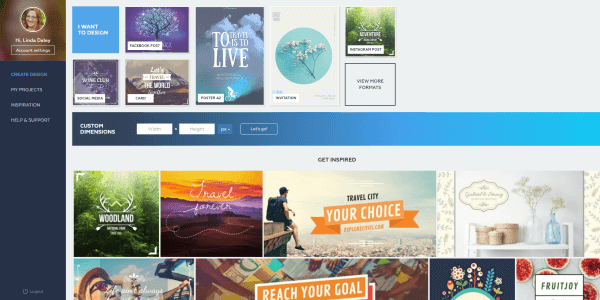
screenshot of Crello home page Just when I thought I didn't need another graphics tool, along came Crello ... yesterday. It's brand new (and I haven't been able to break it yet). If you're frustrated with trying to use Canva , this might be the solution for you. The interface is very much like Canva, yet Crello has veered away in the right places. I've always found the way Canva handles images as backgrounds and layers to be awkward; Crello takes a more simplistic approach. Crello has 6,000+ free templates and 10,000+ free design elements! I know that's going to be exciting to many besides me. Crello lacks some of my favourite Canva features, especially magic resize. But its ease of use and more intuitive interface is winning me over. I know I'll be exploring those 6000+ templates for many many more hours to come. For more info about Crello's functionality, read this press release . Or pop over to Crello.com and jump right in. Have fun, it...

Simple Help for Better Blog Writing

Image
Don't you love it when you find a new tool to make your work easier? One of the benefits of teaching is I also learn from the course participants. It's Hemingway that has my attention this time (thanks to Jacqueline). I love it's simplicity! Go to hemingwayapp.com and start typing right on the screen. You'll see suggested edits highlighted as you type. Or you can turn off the editor until you're finished writing and do all your editing at the end. Another bonus for bloggers is you can see your stats: reading time, letters, characters, words, sentences and paragraphs. Start writing your next article using Hemingway and see what you think. photo by Spongehoe / Flickr Click to Tweet this Article

Super Easy Screen Recording

Image
For a long time, I've been meaning to research and find an easy free screen recording application. It just never made it up very high on my to-do list. A few days ago I had an urgent need to explain something to somebody and words weren't cutting it. I needed to record my screen while I did something but I sure didn't want to spend a bunch of time researching and installing and learning. Saying I am  really impressed with  Screencast-O-Matic (aff) is an understatement. In only 5 minutes I had recorded a 30 second video, signed up for a free account, and sent a link to the video off by email. Seriously, 5 minutes... my first time using it! As an example, here's another short screencast I made just prior to publishing this post, which was easy to share to my YouTube channel. It's about how to check your iContact statistics. Click to Tweet this Article

Selling Public Workshops Online (Several Apps for That!)

Image
A simple process was all I needed to promote two workshops and manage registrations. But, as I often do, I decided to use the opportunity to try out some new ways to do things. Yesterday I put the workshops live for registration. Here are all the different applications I used or will use in my campaign to promote and manage the registrations. my website builder Canva Blogger Hootsuite Social Jukebox iContact PayPal JotForm - my newest favourite app Google Calendar Twitter Facebook Google+ LinkedIn and email Phew! Some of these are integrated, some not, but I had fun pulling it all together (mostly). And the next time I need to fill workshops, it'll take me a lot less time to put everything in place. photo by edkohler / Flickr Click to Tweet this Article

If Efficiency is Your Goal, You'll Want These Tools

Image
“You’re assuming efficiency is my goal,” my good friend replied one day when I suggested a better way (to me) of doing something. Oddly, I might be inclined to say that about some parts of my own work (just not whatever it was we were discussing at the time). This is not a story about the dangers of assuming (although that could be another article). This time I want to dish out some advice about how to be more efficient (since Danielle doesn’t want to hear it). I’ve written before about my essential small business tools ( Part 1 and Part 2 ) but these ones below are especially important to my productivity . FreshBooks (aff) Immediately upon implementing FreshBooks, I saw an improvement in outstanding accounts receivable. Reminders are automated and I rarely have to follow up with anyone myself. No more wondering, "Did I already remind that client?" Canva I've been using graphics applications for over 20 years - for fun and work. Nothing beats Canva's ...

If You Pay Attention to Your Headline, It will Get Attention

Image
When a client mentioned CoSchedule's Headline Analyzer , I hopped on over to check it out. (Thanks Natasha!) Here's the promise I found there: "The free blog post headline analyzer will score your overall headline quality and rate its ability to result in social shares, increased traffic, and SEO value." My initial thought was that it would have to be run by algorithms so its value would be limited. But my skepticism turned to enthusiasm with my first use. The rather mechanical breakdown of my proposed subject line was detailed and looked at different success factors. The Headline Analyzer was useful to help me brainstorm alternatives and especially to consider options I wouldn't have otherwise devised. I think success came partially from paying more attention instead of rushing to publish. Go check it out - it'll take only a few minutes to improve your headline score. photo by Benjamin Ellis / Flickr Click to Tweet this Article

Ink It when you Think It

Image
Do you lose track of your great ideas? I do and I know my clients do, too. I've written before about using an 'idea catcher' . Mine is a notepad but sometimes that's not good enough. Many people have said they get their best ideas in the shower ( here's a tool for that ), while driving or walking, or standing in line. Our ideas are precious but fleeting, and it may not be easy to capture them all in one place. The important thing is to capture them somehow. Handwritten notes : If your notebook isn't handy use the back of a receipt or a napkin. When you eventually write the article, include a photo of your note for visual interest. Typed notes : There are many ways to capture your ideas if you're sitting at your computer. I tend to use Word for lengthier articles or series (kept in a folder called 'content ideas') and I start a draft on my blog for brief articles. Phone or tablet : When you're out and about, use notepad apps, or se...

My Essential Small Business Tools (Part 2)

Image
A sequel to  My Essential Small Business Tools (Part 1) , I hope you haven't been holding your breath waiting. I compiled my list a year and a half ago and, after pulling it out to write this article, was happy to discover that it hasn't changed. I'm still using the same applications and that speaks to their real usefulness. Here are the remaining items on my list of handy dandy tools I use daily or weekly. Canva for Work This program intrigued me right from the start. It makes simple graphic design easy for the inexperienced. While I’ve been doing digital designing of some form for close to 20 years, Canva saves me time with its Abracadabra Resize. It’s not robust, like Photoshop, but it’s not meant to be. Simple and fast, I use it every single day. Hootsuite I use this as my primary Twitter interface. It also helps me manage my planned posts when it’s convenient for me. I use it to schedule my daily enewsletter tips for Twitter, LinkedIn, Facebook and Googl...

Click to Tweet

Image
You might think I am writing about social media but I'm not. I am writing about email marketing. Your newsletter is similar to your blog... you can write it but they may not come. You need to promote your newsletter and nothing works better for promotion than making it easy to share. I have been advocating including sharing icons in your newsletter for a very long time. But my recent discovery of Click to Tweet , used in the Daley Progress blog posts , has made me remember why this is so important. You see, I don't like Twitter. I am always logged in but I never go there. I will retweet what arrives in my email but signing on to read is just never going to happen for me. What I have noticed is that if anything arrives in my email with a double click option to share, I will share it. If I have to open a new window, logon to my social feeds and copy/paste a link. It will never happen! Including a way to easily share your newsletter WILL result in more shares. It really is t...

My Essential Small Business Tools (Part 1)

Image
Whenever I get together with other business owners over lunch or coffee, the conversation often flows to a discussion of how to be more productive. What processes are we using? What contractors are helping? And what tools or apps are useful? I love this sharing of ideas and found out about many of the tools I use regularly from these chats. Those listed below are ones that I use at least weekly - often daily - and consider essential to managing my business. Google Calendar In the newsletter business, we have to keep track of a lot of dates - reminder dates, preparation dates and issue dates - for all our clients on varying schedules. Google Calendar has been invaluable, not only as an organizational and tracking tool, but also as a communication tool because it lets me share my calendars with work colleagues. I have my own calendar of appointments and events, plus a calendar to track all of the important newsletter dates. I use the email and pop-up reminders so I don’t forget a...

Searching for Creative Commons Images

Image
I have fun searching through images, looking for "just that one" that is a visual expression of my written words. Usually I want a look that is less staged than a purchased stock photo. You can access Creative Commons licensed images directly from their website via a number of sources. But I have a Flickr account, so that is where I head first. Once you go to Flickr , here is how you search: First, enter your search term - I used 'newsletter' - and click the magnifying glass. On the next screen, click on 'Advanced Search'. The next screen gives you a variety of search options. Near the bottom, you'll find the Creative Commons option. Select it and then click 'Search'. Make sure you give proper attribution to the photographer - their 'handle' or name and a link to the image. There will be a link which gives you detailed info about the license type - it's always good to double-check. Warning : minutes and even...

Typos Tell a Deeper Story

Image
If you don't think spelling mistakes matter, consider this: photo: CHRIS YOUNG / THE CANADIAN PRESS The headline was: "Kathleen Wynne’s ‘open government’ launch marred by spelling mistake." So, while she was talking about important stuff, eyes were on the spelling error, mouths were snickering, and fingers were tweeting. Her message was lost in the distraction. Do you think someone got reprimanded or even fired over this mistake? Who goofed? Was it the person who requisitioned the sign? The person who ordered the sign? The person who approved the proof? The person at the printer who processed the order? The person who printed it? The person who packaged and shipped it? The person who received and unwrapped it? The person who placed it on the podium? The camera and sound crew who set up and tested, looking right at it? Kathleen herself as she walked to the podium? This wasn't just one person's mistake. There were a lot of people going through the mot...

It's ALL About You

Image
photo by MNicoleM When it comes to marketing, the experts say, “It’s not about you!” It’s something we always emphasize with our new clients, too, when discussing their newsletter content strategy . While your content may not be about you, how you execute your strategy is ALL about you. With all the tools we have at our disposal, there is no excuse for spelling errors, broken links or crappy clip-art. You wouldn't go meet with a potential new client without brushing your hair and teeth. Your marketing content needs hygiene, too. Click to Tweet this Article

When to Send

Image
photo: The Stakhanovite Twins We get asked this a lot, “When is the best time to send out my newsletter?”  The short reply is usually this: Tuesday, Wednesday or Thursday between 9:45 and 10:15am. Then one Thursday morning I received 4 newsletters at exactly 9:45am. The fact is there is no magic answer - no set of best practices or generally accepted principles. There are lots of opinions though and we've seen many of them disproved through our own work. If you review overall average e-marketing statistics for time of day and day of week, no real trends stand out. See an example below. At first I found that kind of surprising but now it makes total sense - because email marketing is so diverse. More specific statistics, such as industry averages, offer some insight... but who wants to be average? This is why it's so important to know your target market! Where will your subscribers be when they receive your newsletter: at home, at wo...

Encourage the Connection

Image
ex ample of connection links Not every newsletter reader is going to want to engage with you in the same way. Each will have a platform they prefer to use. Linda and I are a perfect example of that. Linda likes Twitter . I prefer Facebook . But none of that will matter if you do not include social media connection links in your eNewsletter. Different than social sharing links , social connection links are the ones that take the reader to your page or profile on that platform . These links allow readers to find you everywhere online instantly. If they can't find you, they can't connect with you. Facebook, particularly, has a really crappy search feature. It is common to not be able to find what you are looking for. You want your reader to be able to find and connect with you in a couple of clicks. Encourage the connection by including social connection links.   Click to Tweet this Article

The Devil is in the Details

Image
Mistakes happen – appointments get missed, deadlines slide by, and that phone call doesn’t get returned. These things happen to everyone sooner or later. Sometimes these are things that can be avoided next time, sometimes they’re unavoidable, and sometimes they’re just plain old stupid mistakes. I get so stuck on details sometimes. I know that’s because I make snap judgments and any kind of mistake distracts me. This isn’t the case for everyone though. I value flawless execution… sometimes at the expense of showing up at all. Many of my friends would say that showing up is most important, even if imperfectly. In my world, imperfect might mean a subject line with a spelling error, a hyperlink that doesn’t work, or a bunch of weird html code showing up in a newsletter. These are all little nitpicky details that can have an immediate and negative impact. Here are some tips to help you make sure those little details are right: Haste makes waste. Slow down and concentrate. A...