Posts

Showing posts with the label content creation

Perpetual One-question Survey = Evergreen Content

Image
You and I both know it can be a lot of work to keep the content machine going - blogging, email marketing, social media and more. When I find an idea I can execute in 15 minutes that will give me social media posts and blog content (plus market intelligence) for years, I'm all over that. It's easier to explain if I give you an example - here's my own one-question survey: What is your content creation stumbling block?   Why run a one-question survey? You get market intelligence which is a fancy way of saying you can find out about your target market's problems, or preferences, or habits, or whatever you want to find out. I was curious to know what it is about blogging that people struggle with the most because I want to write articles that are helpful. You get three kinds of content: Calls-to-action to get people to complete your survey - on social feeds, in your newsletter, on your blog, in your email signature, and so on. Sharing the results periodically - on social...

Find Gems in Your Sent Mail

Image
Perhaps you're wondering, "What the heck am I going to write about this week?" Look no further than your Sent mailbox. Over the past month or so, I've answered a lot of questions by email. I bet you have, too. Have you considered that, if one person has a question, many others likely have that same question? Maybe you replied with a 'how-to' or an opinion or a bit of free advice. Maybe you supplied resources to help someone find their own answers. All of these gems can be turned into a blog post or a series of posts even. If you're uncertain about reorganizing and rewriting your emailed messages, you might try a writing template from my  Quick & Easy Content Creation Workbook . You'll be done in no time. Click to Tweet this Article

Social-Media-Friendly Blogging

Image
You've just finished editing (and proofing!) your latest blog post. You pause for a mental happy dance, then you click Publish. Ahh. And now the rest of the work starts. Because, of course, you need to let people know about this new useful and interesting article you've just laboured over. You'll want to share your new article out on your social media feeds multiple times, especially when it's new, and then tapering off over the coming months. And to be efficient about it, you'll want to schedule all of those posts now. So let's start writing the text for those social media posts. What will tease people into clicking and reading? (I'm not talking about lying; teasing is good marketing.) You can write your teaser from scratch. But the fastest thing is to do is to copy text snippets directly from your blog post. That is usually what I do for my own posts. And it's often when I realize I could have done a better writing job. I could have writ...

Try a Newsletter Full of Tidbits

Image
Tidbit is defined as "a small and particularly interesting item of gossip or information." (Just in case you're Canadian and were thinking about chocolate Timbits.) The most successful newsletters I've seen are full of tidbits. A tidbit is short, delightful and easily digested (just like a Timbit). It makes the reader feel like they've instantly learned something. Or it tweaks their curiosity to want to know more about something. Or maybe it makes them laugh and lightens their day. A newsletter full of tidbits also has a little something for everybody . A simple (and darn great) example of this is the newsletter I prep each month for the Nova Scotia SPCA - check out a recent newsletter issue here . Some pet owners only like dogs or only like cats - the newsletter as different articles about either or both. Some people are interested in pet health, others aren't. Some people want to read emotional success stories, others don't. Some shop at the SP...

The Difference Between Editing and Proofing

Image
We often use the words editing and proofing interchangeably but there is a significant difference. If you're not aware of it, you could be failing at both. Editing is big picture or 'zoomed out'; proofing is detailed or 'zoomed in'. Editing is about the overall structure and flow of the article. Are the introduction and conclusion supported by the content in between? Are the paragraphs organized well? Is it easy to read and digest? Are the sentences structured well? When you're reading something and you have to pause to reread a line - that's a signal that editing is needed. Proofing is about grammar and spelling and punctuation. It's often about the little words, like 'of' instead of 'if'. And about missing words, like 'the' or 'an'. It's hard to proofread our own writing because our brains follow the same pattern as when we typed it. Reading out loud, or printing to proof with paper and pencil, are both good...

Does Your Writing Pass the $1-A-Word Test?

Image
Guest post by Neil Everton , Podium Media & Communications Coaching If you are looking for a quick and certain way of giving your words more impact, look no further than your purse or wallet. Take a look at the last thing you wrote. It doesn't matter if it's a letter, email, report, newsletter, web content or promo script. Look at it with a critical eye, and with this question in mind: "Am I prepared to pay $1 for every word I've written?" Go through the script slowly. Strike out every word that isn't working hard to convey meaning. Make sure you use the active voice. 'The man opened the door' is active. 'The door was opened by the man' is passive (and two words longer than the active version). A $2 saving in one short sentence. Look for any of those phrases that slip into our writing unbidden. 'It's my considered opinion' is $3 more expensive than 'I think'. 'At this moment in time' is a long-wind...

What's Your Stumbling Block? Blogging Survey

Image
Ever since I wrote this article -- Where Do You Get Stuck? -- a couple of years ago, I've been on a mission to come up with solutions to content creation obstacles. coming up with ideas adapting your ideas for writing starting to write finishing writing editing and proofing finding or creating graphics keywords and publishing Aside from talking about this a lot with small business owners, I've also been circulating a survey on my social media feeds. If I know where people most often get stuck, I know where to focus my problem-solving efforts. Here are the survey results so far: survey results as of Jan-4-20 If you haven't yet responded to this survey, I'd sure appreciate it if you would -- it's only one question. You can click here to do that now. If you're suffering from any of those first three obstacles, using writing templates will help enormously. You can get a workbook here that includes 15 templates. Click to Tweet this Article

Get Read to Get Ranked

Image
Years ago when I first started doing email newsletters, each new client had questions about writing the introduction to their very first issue. Eventually, I prepared a tip sheet for new clients and also posted the info on my blog thinking it might be useful to others. That was in 2012. Three years later I realized 2 things: the advice I was giving needed to be refined/updated and this was the top-performing post on my blog (by far!) so others were indeed finding it useful. I published a refreshed version with a similar subject line. That was in 2015. Now you can see that these two posts account for a huge chunk of the traffic: all-time stats 2010-2019 And you can see what that organic traffic is searching: all-time stats as of 2010-2019 These readers didn't come to my blog because I did something magic to get Google to rank the posts. People came (and still come) because it's a topic they're interested in and the information is useful. (If you search ...

Editing Checklist for Your Marketing Content

Image
Whenever you write something, it's always a good idea to wait a while before editing - later the same day or the next day. You'll have a fresh perspective and it'll be easier to pick out what can be improved upon. Here are a few things to watch out for when you're editing: Brevity: Cut out every word that adds nothing to the meaning or flow. Each word should be working for you! Read Slice Words to Save Money for examples. Clarity: Use specific adjectives instead of vague ones to increase understanding and interest. Instead of "We received numerous applications to volunteer at the conference," say "We received 33 applications..." Paragraph length: Each paragraph should deal with only one topic or idea. Short is always better. Tone and style: Don't write like a business; write like a human being and use your normal conversational style. Try the "Hi Mom" test . Variety: Avoid starting each sentence or paragraph with si...

How Outlining Gets You Unstuck

Image
This post was written by Liam Friesen , who has recently joined Daley Progress in a part-time support role. (How lucky am I to have a journalism student helping me out?) Telling yourself that you want to start writing an article is simple. The hard part comes when you actually begin. This is an issue that plagues those who know what they want to write about but don’t quite know how to explain it . If this is a problem you run into often, try starting with an outline. From time to time, I struggle when trying to formulate an article. I find myself unable to put my ideas into words and I get stuck. However, when you create a layout or an outline for your topic, you won’t fall into a pit of wordiness and confusion. An outline can appear in any way you want , as long as you include the following: an introduction, your main body information, and a conclusion. The introduction and the conclusion are quite self-explanatory but the main body paragraphs are where most people get lost...

Content Template - Share a Concept

Image
You just had an a-ha moment – by thinking, researching, reading, discussing, learning, teaching, experimenting, or problem-solving. And now you’re anxious to share that new insight with your readers who will also benefit from it. Not sure how to organize your ideas and get writing? Download this content template to get going - and done - in no time. Using content templates is sort of like filling in the blanks. Capture your ideas, organize them, and draft your article quickly. Want more templates? Click here to get the free Quick and Easy Content Creation workbook. Click to Tweet this Article

BE the Rabbit Hole

Image
You know when you've been online for a while - scrolling, reading, tapping - and then realize the time? We may feel good (because we learned something), bad (because something pushed a hot button), or indifferent (what level on HayDay?). Regardless, we still think of these times as getting lost down a rabbit hole. According to Wikipedia,  "Down the rabbit hole" is a metaphor for an entry into the unknown, the disorienting or the mentally deranging, from Alice in Wonderland . Those words may be a bit extreme for our online adventures but the sentiment holds. In class this week, we were reviewing the homework assignment which was to research and sign up for relevant newsletters. One participant said she kept ending up down rabbit holes. Then she looked up and said, "I guess we really want to BE the rabbit hole, right?" Thank you, Cecelia, for that insight! Content marketing is something I've been preaching about since before it was called that. I...

Blogging and Strategic Planning Shake Hands Over a Template

Image
Can you agree that's a subject line you don't see every day? Yet it describes something that happens frequently in small business - the mingling of ideas, processes and tools. One of the templates in my Quick and Easy Content Creation workbook is called "The Laws". I was delighted to recently discover that Megann Willson of Panoptika Inc. used this template to write an article about strategic planning. In essence, she used "The Laws" template as an outlining tool to create a useful strategic planning article that is sort of like a template for success for me - and you - and all her readers. (Thanks Megann!) Read Megann's article on LinkedIn here . Download the Quick and Easy Content Creation workbook with "The Laws" plus 14 more templates here . What "laws" will you write about? Click to Tweet this Article

23 Things to Put in Your Small Business Newsletter

Image
All the experts know that email is still king. If you're starting an enewsletter for your small business, figuring out what content you want to put in it might be one of your first challenges. Here's a quick rundown of a variety of different content sections you might include... but don't use them all at once! Articles by you, including blog posts Articles by others , or links to articles by others Quizzes, surveys How-to’s , tips and tricks, useful tools , resources FAQs - Did you know…? – fast facts, interesting tidbits Book reviews , other types of reviews Interviews Case studies, client showcase What’s new…? – of local/industry interest Testimonial(s) Product spotlights Staff/team spotlights Quotes Current and future promotions and sales Promotions for others (with caution) Events Content that might stay the same each issue (but don't ignore it): Website link Social media links Contact info and links Google map (link) Photo of you/staff/t...

Consider Point of View for All Your Writing

Image
I've done it. You've done it. And they've done it. I'm talking about mixing up points of view when writing. And also using the right point of view for the right purposes. Grammarly has a quick little article explaining  First, Second, and Third Person in case you don't remember from school. Here are some things to consider from a content marketing perspective: Articles, blog posts: Mixing up I-we-you-they-me all in one article might cause confusion. There may be reasons for including all of these words in one article but it's worth re-reading to check. Using both second and third person is something I see often and probably accounts for most of the editing I do. If you are writing to/for your reader, consider using the second person. If you are writing about your own experiences, of course, you have to use the first person. Website: If your business IS you, I recommend writing in the first person (about yourself) and the second person (for features...

Your Blogging Deadline is Looming

Image
It's time to write your next blog post. Or maybe the time has already passed. What do you think when your deadline is looming? My own lament is often, "What can I pull together fast that will be useful?" I talk to a lot of small business owners about blogging - while teaching, networking and over coffee. What I know is this: everyone has different reasons for blogging, or not. Before starting a blog, there are many different reasons, mostly related to the unknown. Once our blog is started, there is another set of obstacles that might give us grief: coming up with ideas adapting your ideas for writing starting to write finishing writing editing and proofing finding or creating graphics keywords and publishing Understanding what stops us , can help us uncover ways to conquer it. This will be my 575th blog post. You might think I've got all the obstacles wrangled - and I did for quite a long time. But since the beginning of this year, I've been st...

Quality Control for Your Content

Image
You've just finished an insightful new article for your blog. You're anxious to publish it and find out what your readers think. Depending on the topic and type of article you've written, it might make sense to do a little research before publishing. Researching after writing might seem backward but it has helped me many times. Here is why I often research after writing: To check that I haven't missed something really important on the topic. To see what others' opinions are and whether there are points of debate I haven't addressed. To make sure my information, instructions or lists are complete. To develop a headline by seeing what shows up in Google searches. Every time I research after writing, I've been glad I did. I often find ways to enhance my article and, even if I don't, it gives me confidence that I've done a good job. Click to Tweet this Article

Simple Content Planner in Trello

Image
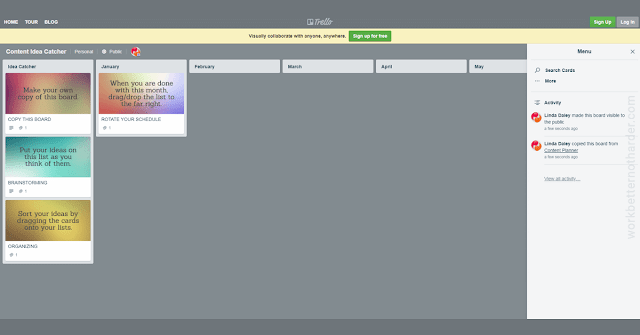
A few months ago I found a new best friend when I started working with a client who uses Trello. While the client is indeed a friend, the free Trello app is what I'm talking about here. Trello is visual like a bulletin board and, the more things I use it for, the more organized and productive I'm becoming. I have no shortage of content ideas and I'm pretty good about catching them but, well, not necessarily all in one place. I have a notebook, Word docs in a folder in Dropbox, and as of right now, 22 draft posts on this blog. Recently I discovered a recorded message I'd made for myself last year on my phone. Catching ideas and organizing them into a content calendar are two different things - and both can be handled easily with Trello. Here is a link to a public board I created and which you can copy and make your own. If you've used Trello before, you might find this overly simplistic but, well, I'm all about simple. If you haven't used Trell...

Get Focused Before You Start to Write

Image
If you want to be doing more content marketing but aren't, do you know what's stopping you? A few months ago I wrote this article -  Where Do You Get Stuck? - and ever since I have been committed to developing solutions for these stumbling blocks: coming up with ideas adapting your ideas for writing starting to write finishing writing editing and proofing finding or creating graphics keywords and publishing Adapting ideas for writing (#2) is a common challenge for small business owners who may not have much writing experience. Here is a way to conquer that stumbling block. 5 Steps to Plan Your Article Before You Start to Write #1. What is your purpose or goal? To give or explain information To persuade with your opinions To share ideas, thoughts or concepts Knowing your goal will inform the style you use for writing. Giving information requires a good detailed outline, simple words, and facts. Persuading requires good research and planning, examples, and...

How to Answer a Question on Your Small Business Blog

Image
You might think your website FAQ page is the best place to answer questions but I would argue that your blog is even better. In fact, I suggest your FAQ page should list the questions, and perhaps short answers, with links to blog posts for more detailed answers. If your answers to frequently asked questions are individual blog posts, that content is ultimately more shareable via social media, email or chatbot. It's also a great way to make use of common keyword phrases, boosting your SEO. The Question The question you're answering might serve well as your post title or you might include it in your first paragraph. If it makes sense, you might also add some context which gives information about who the answer is for. For example, I might mention that I get asked this question often when networking with other small business owners. The Answer Generally, there are two types of answers. Facts and/or opinions: In this case, the question might start with something...