Posts

Showing posts with the label productivity

How Outlining Gets You Unstuck

Image
This post was written by Liam Friesen , who has recently joined Daley Progress in a part-time support role. (How lucky am I to have a journalism student helping me out?) Telling yourself that you want to start writing an article is simple. The hard part comes when you actually begin. This is an issue that plagues those who know what they want to write about but don’t quite know how to explain it . If this is a problem you run into often, try starting with an outline. From time to time, I struggle when trying to formulate an article. I find myself unable to put my ideas into words and I get stuck. However, when you create a layout or an outline for your topic, you won’t fall into a pit of wordiness and confusion. An outline can appear in any way you want , as long as you include the following: an introduction, your main body information, and a conclusion. The introduction and the conclusion are quite self-explanatory but the main body paragraphs are where most people get lost...

There's an Email Battle Brewing

Image
Email bots are coming. Now, your reaction might be "Ugh!" but mine was, "Yay!" And that's part of the challenge. Here's another part: they are heaven-sent for spammers. Yes, that deserves an "Ugh!" What I'm excited about are all the possibilities for improving productivity in our daily routines . As a simple example, I'm currently running an email bot to help me memorize a list of items. It "uses a spaced repetition algorithm to bring some piece of information to (my) attention at the optimum interval for memorization." This coming battle between productivity and bad marketing practices will be epic. It will likely cause the reinvention of email communication. This new technology has such endless possibilities to improve our work (and our lives) but it's already being exploited by spammers. We won't be able to ignore its coming. Email bots can chop through firewalls and other security measures, improving deliver...

Your Blogging Deadline is Looming

Image
It's time to write your next blog post. Or maybe the time has already passed. What do you think when your deadline is looming? My own lament is often, "What can I pull together fast that will be useful?" I talk to a lot of small business owners about blogging - while teaching, networking and over coffee. What I know is this: everyone has different reasons for blogging, or not. Before starting a blog, there are many different reasons, mostly related to the unknown. Once our blog is started, there is another set of obstacles that might give us grief: coming up with ideas adapting your ideas for writing starting to write finishing writing editing and proofing finding or creating graphics keywords and publishing Understanding what stops us , can help us uncover ways to conquer it. This will be my 575th blog post. You might think I've got all the obstacles wrangled - and I did for quite a long time. But since the beginning of this year, I've been st...

Simple Content Planner in Trello

Image
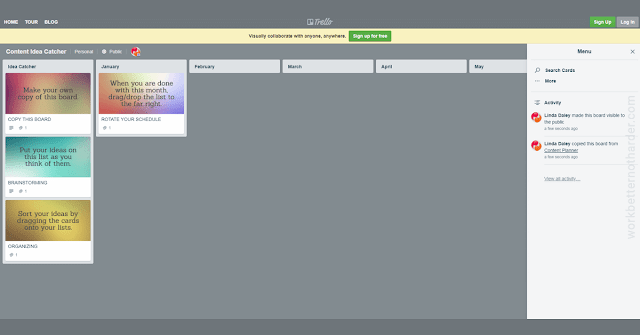
A few months ago I found a new best friend when I started working with a client who uses Trello. While the client is indeed a friend, the free Trello app is what I'm talking about here. Trello is visual like a bulletin board and, the more things I use it for, the more organized and productive I'm becoming. I have no shortage of content ideas and I'm pretty good about catching them but, well, not necessarily all in one place. I have a notebook, Word docs in a folder in Dropbox, and as of right now, 22 draft posts on this blog. Recently I discovered a recorded message I'd made for myself last year on my phone. Catching ideas and organizing them into a content calendar are two different things - and both can be handled easily with Trello. Here is a link to a public board I created and which you can copy and make your own. If you've used Trello before, you might find this overly simplistic but, well, I'm all about simple. If you haven't used Trell...

3 Ways Having a Social Media Strategy Will Save You Time

Image
Guest post by Anita Kirkbride Have you ever noticed how being overwhelmed by something tends to make it suck the time right out of your day? The more overwhelmed you feel, the longer it takes to get it done? All entrepreneurs get that feeling about something and many have learned tactics to deal with it and get things done more efficiently. Ben Franklin famously said, “ For every minute spent in organizing, an hour is earned ,” and it has never been truer than for planning your social media marketing! If your paralysis stems from social media, the best way to get moving is to create a social media strategy and plan out what you need to be doing. Here are three ways doing so will save you time: Knowing what to post Simply having a plan for what you need to post each day cuts the time you spend trying to figure that out. If you’ve ever stared blankly at your screen, wondering what to post on Facebook, you know what I mean. Taking the time to plan your content in adva...

13 Simple, Direct ideas for Client Relationship Building

Image
(guest post by Natasha Marchewka) Do you need help with keeping in touch with past clients without "bugging them"? When working as an isolated freelancer or small business (and where building your business is all on you) there are ways to efficiently and effectively build, strengthen, and grow relationships. Keeping in touch regularly can be a bit of a conundrum. You want to remind them you exist, but you need to find a balance of being seen and heard and not overdo it. So, you created a newsletter to email clients once a month. I think that's great - and important - and keeps you relevant, top-of-mind, and also keeps you on your toes. What else can you do to remind them you exist as they are distracted daily... and still forget you exist? Here are some ideas. And, as an added bonus you'll have relevant content to share on your social media feeds! Client Relationship Building Check-list: Visit your clients' websites and check if they added anything...

Online Products Don't Sell Themselves

Image
Of course, we all know this, don't we? Yet there is a multi-million dollar industry based on DIY marketing that somehow makes us forget this VERY IMPORTANT aspect of our business strategies. Or perhaps it makes us feel overconfident in our abilities to both sell and market our own products. Being reminded of the work involved to prepare, and then sell and market an online product was my biggest takeaway (of many) from the day I spent with Frances Leary this week. I knew it, now I feel it... a refreshing dose of reality. So, even though I'm capable of doing much of the "work" part of my project, I'm paying for expert help so I can stop talking about it and get it done. Can I contain my inner control freak enough to let this happen? I'm determined. Click to Tweet this Article

What Do You Need To Say YES To?

Image
(guest post by Natasha Marchewka) Do you find you are saying NO to everything lately, to keep the status quo? I was... because I was overwhelmed and afraid. I already had enough daily commitments to keep me busy for the next 10 years. And then, I had a shift of perception. I realized that to grow (or be happier or fulfilled), I needed to say YES to things that stretched me. Further, what is entrepreneurship without risk taking? It doesn’t exist. That said, I’ve taken on MANY new commitments that I suddenly have the energy for because they all seem like where I need to be. In all cases, the yes’s come in the form of helping others in some way. When’s the last time you said yes to something that you felt enthusiastic about? Even when our plates are full, I believe there is room to say yes to commitments that ring true with us on a deep level. Taking a risk is part of living fully with the potential to fail or succeed. Either way, you succeed. I’m saying YES because I...

Start Using This Today: Client Relationship Check-in Checklist

Image
(guest post by Natasha Marchewka) Life is good as a freelancer or small business owner. No one to answer to, but our own clients, of course. No one breathing down our necks to make sure we’ve done THEIR job correctly. We get to “do it all” ourselves. Autonomy. It’s a freedom we’ve longed for... And now, we get to “do it all” ourselves. Sales, inbound and outbound marketing, bookkeeping, client management, admin, social media... oh, and that part about providing a product or service... We have to do what we do best and a bunch of stuff we, maybe, don’t do that well. So, we hire out when possible. (Thank you @daleyprogress!) In the process of putting the pieces together of my own business as a voice actor , I’ve managed to figure out how to do a lot of things on my own. On top of it all, I work at documenting everything because I happen to be a list maker. And as I dig deeper and deeper to give back to the world, I’ve discovered not everyone IS a list maker , and most p...

Best Beginner Business Blogging Advice

Image
If you're planning to begin blogging for your business, I'd like to shorten your learning curve. Because, oh boy, do you ever have lots to learn. The good news is that you don't need to know it all before you start, and learning as you go is fun. I asked a couple of award-winning business bloggers to give me their best advice for beginners so I can pass it onto you. Mary Jane Copps , aka The Phone Lady , has been blogging weekly for her business since 2009. Here's what she says: 1. Embrace a schedule. While it feels daunting to commit to a daily, weekly or monthly blog, staying true to a posting schedule will make you a better writer, and you will develop the ability to create and uncover great story ideas. 2. Be observant; write it down. No matter what the theme of your blog, things will appear in your life each day that can become a post. Stay present to every phone call, meeting and event. Great content is everywhere. But don't rely on your memory; keepi...

Storage for Great Ideas - Back of Book (BOB)

Image
Do you often flip to the back page of your notebook to jot down content ideas ? If not, start! When I'm teaching small business classes about online marketing, I insist they start a page in the back of their notebooks for jotting down ideas for blog or social media posts. This page will extend beyond one, but it's the start of something great. BOB (for back of book) becomes a new friend... your idea catcher . When you are looking for something to write about or post, check your BOB for ideas. Click to Tweet this Article

How to Get People to Open Your Emails

Image
How long did you think about the subject line of that email you just sent to your brand new client? Will they be interested or excited to open it? Or will they leave it sitting unopened, floating closer to the bottom of their inbox? I've discovered a little quirk. In fact, it feels more like a secret I shouldn't acknowledge, maybe even a tad manipulative. It didn't start out that way but now I know what I know... well, I can't un-know it. Here it is. If I send an email to any of my work friends with the words 'no rush' in the subject line, it's likely to get opened faster than any other email I send them. Of course, this may not work any longer once my friends read this article. But let me be clear, I've never used that knowledge to manipulate. And that's why it works. When I send an email with 'no rush' in the subject line, I really mean there's nothing inside requiring their attention soon. Usually it's a business idea in ...

Crello is Not Just Another Pretty Graphics Tool

Image
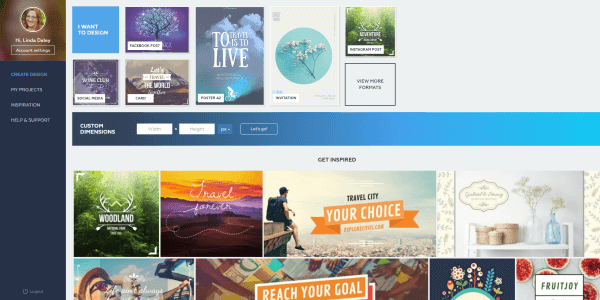
screenshot of Crello home page Just when I thought I didn't need another graphics tool, along came Crello ... yesterday. It's brand new (and I haven't been able to break it yet). If you're frustrated with trying to use Canva , this might be the solution for you. The interface is very much like Canva, yet Crello has veered away in the right places. I've always found the way Canva handles images as backgrounds and layers to be awkward; Crello takes a more simplistic approach. Crello has 6,000+ free templates and 10,000+ free design elements! I know that's going to be exciting to many besides me. Crello lacks some of my favourite Canva features, especially magic resize. But its ease of use and more intuitive interface is winning me over. I know I'll be exploring those 6000+ templates for many many more hours to come. For more info about Crello's functionality, read this press release . Or pop over to Crello.com and jump right in. Have fun, it...

Simple Help for Better Blog Writing

Image
Don't you love it when you find a new tool to make your work easier? One of the benefits of teaching is I also learn from the course participants. It's Hemingway that has my attention this time (thanks to Jacqueline). I love it's simplicity! Go to hemingwayapp.com and start typing right on the screen. You'll see suggested edits highlighted as you type. Or you can turn off the editor until you're finished writing and do all your editing at the end. Another bonus for bloggers is you can see your stats: reading time, letters, characters, words, sentences and paragraphs. Start writing your next article using Hemingway and see what you think. photo by Spongehoe / Flickr Click to Tweet this Article

If Efficiency is Your Goal, You'll Want These Tools

Image
“You’re assuming efficiency is my goal,” my good friend replied one day when I suggested a better way (to me) of doing something. Oddly, I might be inclined to say that about some parts of my own work (just not whatever it was we were discussing at the time). This is not a story about the dangers of assuming (although that could be another article). This time I want to dish out some advice about how to be more efficient (since Danielle doesn’t want to hear it). I’ve written before about my essential small business tools ( Part 1 and Part 2 ) but these ones below are especially important to my productivity . FreshBooks (aff) Immediately upon implementing FreshBooks, I saw an improvement in outstanding accounts receivable. Reminders are automated and I rarely have to follow up with anyone myself. No more wondering, "Did I already remind that client?" Canva I've been using graphics applications for over 20 years - for fun and work. Nothing beats Canva's ...

Summer Action Leads to Fall Success

Image
Summer may be a sluggish time for many businesses but it doesn't have to be. Use the slower pace to your advantage. Take the Time to Get Inspired Do more reading. Watch more videos. Have more chats over coffee. Take online or offline courses. All of these will generate ideas for content and beyond. Spend some time refreshing your marketing strategy. Stick Around Why don't you be the one who hangs around all summer while everyone else disappears? Whether it's your newsletter, blog or social media, or all three, maintain your commitment to your fans. If not, you might not be missed all summer but people will realize you deserted them when you show up again in the fall. Use Automation I'm all for vacations but even then you don't have to drop out of sight. Continue to give value by using tools to schedule social media posts. Prepare and schedule your newsletters and blog posts in advance. Use your voicemail and email automated messages to keep people a...

eMail Productivity: Automate Customer Reminders

Image
For small business owners, nurturing long term relationships is critical, so keeping in touch with past customers to encourage them to return is a worthwhile activity. Dentists have been doing it for years with their cute cartoon postcards reminding us to book our next check-up. It's time to take that process online and use our bulk email application to automate it. And we can apply it to more than patients. While this process can be handled exactingly by a workflow app, you don't need the expensive software to make it work for you. One of our long time clients, HealthWalks Shoe Store and Orthotic Clinic in New Glasgow, NS, has been sending reminders by email for a few years now. Here's how it works... Initially I created the template based on a postcard HealthWalks had been mailing to customers one year after receiving their orthotics. Now, each month I receive a list of contacts who have just passed the anniversary date of when they received their orthotic...

eMail Productivity: Automate Course Certificates

Image
If you're a teacher or trainer, you've likely struggled with the process of providing Certificates of Completion (or Certificates of Attendance and such) to your workshop attendees. Using a Word template, your process might be something like this: prepare your spreadsheet for a mail merge, complete the merge, convert each .doc to .pdf, print, fold, mail merge the envelope addresses, print labels, affix to envelopes, stuff envelopes, lick stamps, run to the post office. Even if you're paying someone to do this for you, it's pretty labour intensive and prone to error. Add the cost of printing and postage, and providing certificates isn't cheap. Consider using your bulk email application , such as iContact , to automate this process. There is a little set up involved but, once it's done, it's quick and easy to use. How to set-up your certificates: First design a certificate template in your email application. You can do this in much the same way as you...

My Essential Small Business Tools (Part 2)

Image
A sequel to  My Essential Small Business Tools (Part 1) , I hope you haven't been holding your breath waiting. I compiled my list a year and a half ago and, after pulling it out to write this article, was happy to discover that it hasn't changed. I'm still using the same applications and that speaks to their real usefulness. Here are the remaining items on my list of handy dandy tools I use daily or weekly. Canva for Work This program intrigued me right from the start. It makes simple graphic design easy for the inexperienced. While I’ve been doing digital designing of some form for close to 20 years, Canva saves me time with its Abracadabra Resize. It’s not robust, like Photoshop, but it’s not meant to be. Simple and fast, I use it every single day. Hootsuite I use this as my primary Twitter interface. It also helps me manage my planned posts when it’s convenient for me. I use it to schedule my daily enewsletter tips for Twitter, LinkedIn, Facebook and Googl...

Action Plan for Creating Marketing Collateral for Events

Image
You know that a killer marketing campaign is critical to your event's success. But, wow, it's a lot of work! While every event marketing project I take on is a little different, there is a general process I follow to create the marketing collateral. Creating the various items in an overlapping sequence allows me to save time...  and my clients to save money. Perhaps my process can give you some ideas to improve your productivity, too. #1. Assemble, create and edit all the components of the marketing message. This includes things like logos, graphics and images, taglines and text, biographies, PayPal button code, and ALL the logistics, such as date, location and price. #2. Create and edit images. Canva for Work doesn’t give you all the power of Photoshop but it pulls its weight when it comes to productivity. I can quickly make a whole raft of sizes and versions to suit every online or print need. #3. Create the email message in a bulk email program. I usually s...