Posts

How to Deliver Valuable Content
Image
If you’ve struggled with success when it comes to blogging, newsletters or even social media, it may be because you’re missing the essential ingredient - value . There are many things you can do right or wrong but, if you aren't giving value, the rest won't matter much. Another thing I know for a fact is that giving value is work and requires commitment . If you're OK with a little hard work, let's get back to the part about giving value and look at ways to do that, along with some examples. Content that is in short supply or in high demand This is content can't be found anywhere else. Insider information is a prime example. Or perhaps it’s time sensitive and can’t be gotten as fast anywhere else. An example is Mari Smith and her exclusive Facebook content . If you are the single source for information that people want, you’ve got it made. Once you build your reputation, your opinions could also be included in this category. Many of you will already be...

eNewsletters and Charities in Canada

Image
If you Google " CASL and charities " (in Canada), you'll find lots of reading on the subject. I'm not going to repeat all that here but rather give a quick snapshot of how CASL (Canadian Anti-Spam Legislation) impacts charities. CASL applies to 'commercial electronic messages'. This means that most (but not all) communications sent from charities are completely exempt from the requirements as they wouldn't be considered 'commercial'. Soliciting donations is okey dokey, as long as the charitable donation # is included. Things to be careful about ( may void the exemption): paid advertisements (funders/sponsors might be a grey area) promoting programs/courses "offering services to individuals who may benefit, where there is a cost-recovery element (for materials, for example)" internal job advertisements (because there's a commercial aspect, this may also be a grey area) Even if a message is not exempt, it ...

Do Not Disturb (with eMail)

Image
Once a contact unsubscribes , you don't have (express or implied) permission to email them again... unless they opt back in themselves or initiate a business transaction with you. While all of CASL may not be easy to understand, this is pretty straightforward. The example shown here is a no-no. Depending on the audience, the reaction may be less severe, but I can't imagine sending an email to everyone who has unsubscribed from my own newsletter over the years inviting them to come back. While you might not object, and some might resubscribe, I'd be asking to be flagged as spam - and rightfully so. While it's partly about respecting my fellow business owners, it's also about protecting my own reputation. Like any other parts of your business, when you get a bright email marketing idea, think it through (and even research) before jumping on the bus. Click to Tweet this Article

eMail Productivity: Automate Customer Reminders

Image
For small business owners, nurturing long term relationships is critical, so keeping in touch with past customers to encourage them to return is a worthwhile activity. Dentists have been doing it for years with their cute cartoon postcards reminding us to book our next check-up. It's time to take that process online and use our bulk email application to automate it. And we can apply it to more than patients. While this process can be handled exactingly by a workflow app, you don't need the expensive software to make it work for you. One of our long time clients, HealthWalks Shoe Store and Orthotic Clinic in New Glasgow, NS, has been sending reminders by email for a few years now. Here's how it works... Initially I created the template based on a postcard HealthWalks had been mailing to customers one year after receiving their orthotics. Now, each month I receive a list of contacts who have just passed the anniversary date of when they received their orthotic...

Content Template - What I Learned

Image
Using a content template is sort of like filling in the blanks on a form. It will get you started and make your writing time more productive. The purpose of this content template is to help people learn something new... and the best way to learn it. Grab the What I Learned content template here (pdf) . Get More Templates If you like this template, grab the mini workbook Quick and Easy Content Creation with 14 more templates , plus some tips for using them to be more productive. Click to Tweet this Article

Content Ideas for Consultants - Getting Started (Part 1)

Image
Just this week I heard it again: “If I start a newsletter, what would I put in it?” While I can think of lots of content ideas for just about any business owner I meet, it’s not so easy for everyone. In fact, it wasn’t always easy for me either. It gets easier, and you get better, with practice. For consultants, there’s an added bonus to spending time creating marketing content and that's learning . Benjamin Franklin said, “There is no better way to learn than to teach.” Sharing valuable content is teaching and, when you’re creating content for your blog or newsletter, you’ll also be doing research, checking assumptions, and developing opinions . If you’re a new business owner, or new to developing content, finding a place to start might feel like picking a needle out of a haystack. In this series of posts, I'll explain how to get started and accomplish other goals, too. Build Your Confidence Since confidence comes from writing about what you know , start with crea...

The Lazy Approach to Blogging

Image
Here's how the lazy approach works: don't blog for the sake of keeping a schedule; only blog when you have something to say. Have you heard that advice yet? Pretty simple, eh? No pressure at all. Just push a post out whenever the mood strikes, and if it doesn't... oh well. Here are the benefits of adopting this schedule-less strategy: No commitment to readers. They won't be expecting anything so if you reach their inbox, maybe it'll be a surprise. Or maybe they won't know who you are. No pressure to keep current . This is a clear benefit in a business world of constant change. You can call yourself an expert . Your ideas are so captivating that you only need to have 3 or 4 a year. (Maybe I'm confusing this with a guru.) No wasted time communicating with readers. Relationships take up precious time, after all. No stress - ever - about meeting a deadline . If you haven't guessed yet, I think this is a bunch of nonsense. If you want to exc...

My Blog Post Recycling Process

Image
Each time I post a new article on this blog, there are a few regular things I do to start the recycling process. You may find some of these useful, too. #1. After emailing subscribers and posting on my social media feeds, I save time by immediately scheduling some future tweets (including images) using Hootsuite - once a month for the next 3-4 months. #2. Next, I grab sentences that can stand alone as tips or quotes for posting on social media. These go into a spreadsheet so I can continue to rotate them, for example, my daily enewsletter tips. ( You can grab a similar spreadsheet here. ) #3. I fire up Canva and make some graphics with tips and quotes for future use. I've got a file folder I can delve into when I need something to post. #4. If the blog post was a suitable list or process, I file it with my soon-to-be infographics . #5. About a year later, I'll review the post with the intention of repurposing my ideas. Depending on the post, I may expand on ...

Repeating Ideas is Strategic

Image
I'm a big fan of recycling content for a few reasons. I've written about 350 blog posts and I know you haven't read every one. That means you've likely missed a good idea that might appeal to you - so I should repeat my ideas. Finding different ways to do that means my ideas will impact a larger audience. Rereading my past articles often triggers new ideas for me to write about. Plus I make the most of my content creation time investment. photo by localben / Flickr originally published in  Work Better, Not Harder on April 28, 2016 Click to Tweet this Article

eMail Productivity: Automate Course Certificates

Image
If you're a teacher or trainer, you've likely struggled with the process of providing Certificates of Completion (or Certificates of Attendance and such) to your workshop attendees. Using a Word template, your process might be something like this: prepare your spreadsheet for a mail merge, complete the merge, convert each .doc to .pdf, print, fold, mail merge the envelope addresses, print labels, affix to envelopes, stuff envelopes, lick stamps, run to the post office. Even if you're paying someone to do this for you, it's pretty labour intensive and prone to error. Add the cost of printing and postage, and providing certificates isn't cheap. Consider using your bulk email application , such as iContact , to automate this process. There is a little set up involved but, once it's done, it's quick and easy to use. How to set-up your certificates: First design a certificate template in your email application. You can do this in much the same way as you...

How to Set Up a PayPal Link to use in eMail

Image
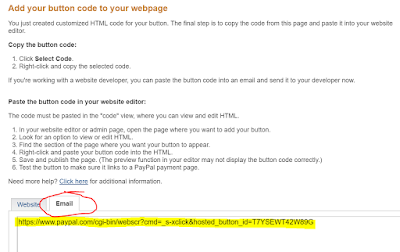
When promoting anything, it's always best to have a way for people to pay right away. PayPal is usually an easy way to do this but sometimes I need a PayPal button in a place where I can't embed the html code, like in an email, Word document, or social media post. You may not know there's a simple way to get a PayPal link without the button code . It's a link just like any other url and can be shared anywhere online (although it's an ugly link so you'll want to hide it behind text). Here's the caveat: you have to avoid using any of the 'customize button' options. Once you're finished creating your button, on the next screen, click the tab for 'email' and copy the link. (see image) Now you can have people 'Buy Now' using that link instead of having to embed a PayPal button. Click to Tweet this Article

Content Template - The Newsjack

Image
Every part of your business needs some type of content. And you need to develop content consistently to reap the benefits. There's a content creation trick that can speed up the process by providing structure. Using a content template is sort of like filling in the blanks on a form, and often in a particular order. Don't waste time staring at a blank screen. Use a template and plug in your ideas to create fresh original content. This technique allows you to write quickly. The Newsjack Template The purpose of this template is to help your readers stay up-to-date with news that affects them, such as breaking industry news or new regulations. Click here to download this template now (.pdf). Get More Templates If you like that one, grab our mini workbook Quick and Easy Content Creation which has 15 templates, plus some tips for using them to be more productive. Click to Tweet this Article

What Happens Once You're Found?

Image
"We’ve mistakenly made being found the number one goal of our marketing."  ~ Bernadette Jiwa This line from a recent article really caught my attention. Over the past few years I've heard many people talk about SEO (search engine optimization) as something desirable without really knowing why. SEO is something done to your website so it'll be found in Google searches . So, what happens when someone gets there? There's no value in investing in SEO if your website can't make something more happen when a potential customer arrives. Imagine having a store with no employees. First, make sure your website can work for you. It should contribute to reaching your business goals and the here's-what-we-do-feel-free-to-call approach won't do much for you. It's one thing to get found and quite another to make the sale. Click to Tweet this Article

Bragging Writes

Image
You'll see in this newsletter that success stories make great marketing content. There's positive emotion around a good story - we like to read them and share them. It's a bonus that they come in many different forms: testimonials, case studies, photos of happy customers or completed work, statistics, even video. Success stories can also be assembled in a lot of different ways. For example: written by you, or by your client spontaneous (such as on Twitter), or solicited about your products and services, or about your business itself (for example, a 10 year anniversary) short or long (useful for different purposes) numerical or graphic (such as statistics) Don't stop at collecting testimonials. There are many more ways to tell your story. originally published in Work Better, Not Harder March 30, 2016 Click to Tweet this Article

How to Flip Off 250,000 People

Image
"No longer are we padding our metrics with vain, inflated subscribers who ultimately harm our deliverability and email performance. Instead, we're keeping our email list smaller, but way healthier and more effective." - Hubspot,  What Happened to Our Metrics After We Stopped Sending So Much Email , March 30, 2016 Apparently their metrics are more important than goodwill, mistake or not. Click to Tweet this Article